Electric fence alarm integration: relays, RS485, network and CCTV

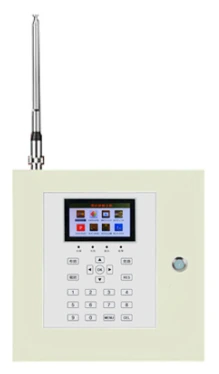
Integration uses dry contacts, RS485 or network. A K10 host provides 8 wired inputs and 1–128 addresses, with camera presets per zone; test 100% of zones at the far end and confirm that each alarm reaches the control room within 2 s.
A perimeter sensor that cannot reach a screen, a siren or a camera is a local gadget. Integration is what turns a collection of detectors into a response. The good news is that most perimeter devices already expose the three interfaces that matter: dry contacts, RS485 and network.
The hard part is not wiring; it is agreeing on what an alarm means. This note covers the interface choices and the naming discipline that keeps a map usable after handover.
What outputs should a sensor provide?
At minimum, a dry NO/NC contact for the alarm and a separate tamper or fault contact if the device supports it. A 12 V siren output is useful for local deterrence. For anything beyond a single zone, RS485 or network is needed so the host can read zone identity, not just “an alarm happened”.
A contact without an address is a binary input. It is fine for a small gate or a shed, but on a 10-zone perimeter it forces the installer to run one cable per zone back to the panel. That is more copper, more terminals and more places for a loose wire.
| Interface | Best for | Limits |
|---|---|---|
| Dry contact | Gates, sheds, single zones, legacy panels | No identity; one pair per alarm |
| RS485 | Daisy-chained hosts, up to 128 addresses | Bus length and cable quality; no star wiring |
| Network | Long runs, platform integration, remote sites | IP planning, switches, cyber hygiene |
| GPRS / NB-IoT | No cable route, remote gates | Coverage, subscription, latency |
RS485 or network — which should you use?
Use RS485 when the hosts are in a line along the perimeter, the distance is within the cable limit, and a control keyboard or host is nearby. Use network when the perimeter is long, the hosts are spread across buildings, or the platform needs to see them directly. Many sites use both: RS485 for the fence line, network for the control room link.
Do not mix the two on one bus with a passive converter and assume it will work. Converters fail in heat, and a failed converter takes down every host behind it. If a converter is necessary, put it in a conditioned enclosure and document its power source.
How do you link cameras without a full VMS project?
Most cameras and NVRs accept alarm inputs or ONVIF events. Use the host’s relay to trigger the camera preset, or send the zone event over the network to the NVR. The goal is a close view of the fence line, not a wide view of the whole yard. A camera that shows “something moved somewhere” does not help the guard.
Set the preset before the alarm occurs and test it from the control room. A preset that points at the wrong post is worse than no preset, because the guard trusts it. Record the preset number in the zone schedule.
How do you keep the zone map accurate?
Treat the zone map as a controlled document. It needs a version, a date, a change log and one owner. Every time a gate is added, a wall is extended or a camera is moved, the map, the host labels, the platform names and the printed copy must change together.
Walk the map after every change. A map updated at a desk can drift from the site for years; the guard is the person who discovers it at 02:00. Make “map walk” part of the quarterly maintenance routine.
What happens when the network fails?
Design for a local alarm that survives the network. The sensor host should still trigger the siren and the local relay when the platform is unreachable. The platform should show a device as offline, not as “no alarm”, because those are different states.
For remote sites, add a heartbeat and an offline alert. A site that has been offline for a week should generate a maintenance ticket, not a quiet dashboard. The most dangerous alarm is the one that never arrives.
How do you test the response chain?
Trigger the sensor, watch the host, watch the platform, watch the camera, listen for the siren, and confirm that the guard received the message. Do this for one zone in each response area, at night if possible. A chain tested only at the host is not tested.
Record the time from trigger to guard acknowledgement. That number, not the sensor’s response time, is the site’s real response time. If it is too long, fix the chain before adding more sensors.